LiDAR Scanner Cable iPhone 15 Pro (ReLife)
New
ReLife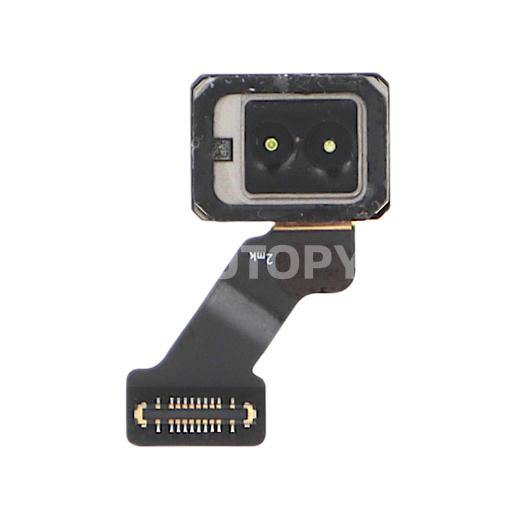

LiDAR Scanner Cable iPhone 15 Pro (ReLife)
New
ReLife
Specifications
- Product type Flex
- Quality ReLife
- SKU IL-IP15PR
- EAN Code 3667075308263
- Warranty 6 months (UTOPYA)
Compatibility
0,40€
In stock

Delivered tomorrow before 13:00
by ordering before 18:00
Product Description
LiDAR Scanner Cable iPhone 15 Pro (ReLife)
Description
The LiDAR scanner cable for iPhone 15 Pro combines the infrared laser remote sensing sensor and its flexible FPC connection flex cable. This module ensures instant calculation of distance and depth of field on Apple iPhone 15 Pro models (A2848, A3101, A3102, A3104). It plays a decisive role in the speed of photographic autofocus in low-light conditions, the optimisation of night portraits, as well as the precision of augmented reality and 3D modelling applications.
This replacement flex cable allows you to repair a device whose original sensor was severed or damaged during screen disassembly or a frame replacement. It resolves faults related to the lack of night focus, Measure app malfunctions or environmental detection anomalies. It is an original part sourced from a working device, carefully tested and validated as part of UTOPYA's ReLife certification.
Technical Specifications
- Type: Flexible FPC flex cable with infrared LiDAR scanner sensor
- Function: Laser beam distance detection, depth of field and autofocus assistance
- Quality: ReLife (original disassembled and tested part)
- Connector type: Specific FPC connector for iPhone 15 Pro motherboard
Advantages
- Original manufacturer component ensuring metric precision identical to the initial factory part.
- Complete restoration of augmented reality, 3D measurement and low-light Portrait mode functions.
- ReLife certified module, tested on a test bench to certify the integrity of the flex cable and the infrared sensor.
- Micrometric adjustment and seamless fit into the designated housing on the frame.
Installation Advice
- You must disconnect the device's battery before any handling or connecting the flex cable to the motherboard.
- Handle the flexible circuit with an anti-static spudger without making sharp bends at the connection tracks.
- Ensure the optical lens and the frame housing are clean before clipping the sensor into place.
- Test the scanner functions using the Measure app and the camera in low light before completely reassembling the device.
0,40€
0,40€
In stock
Delivered tomorrow before 13:00
by ordering before 18:00
Related accessories
Page 1 sur 5
See All